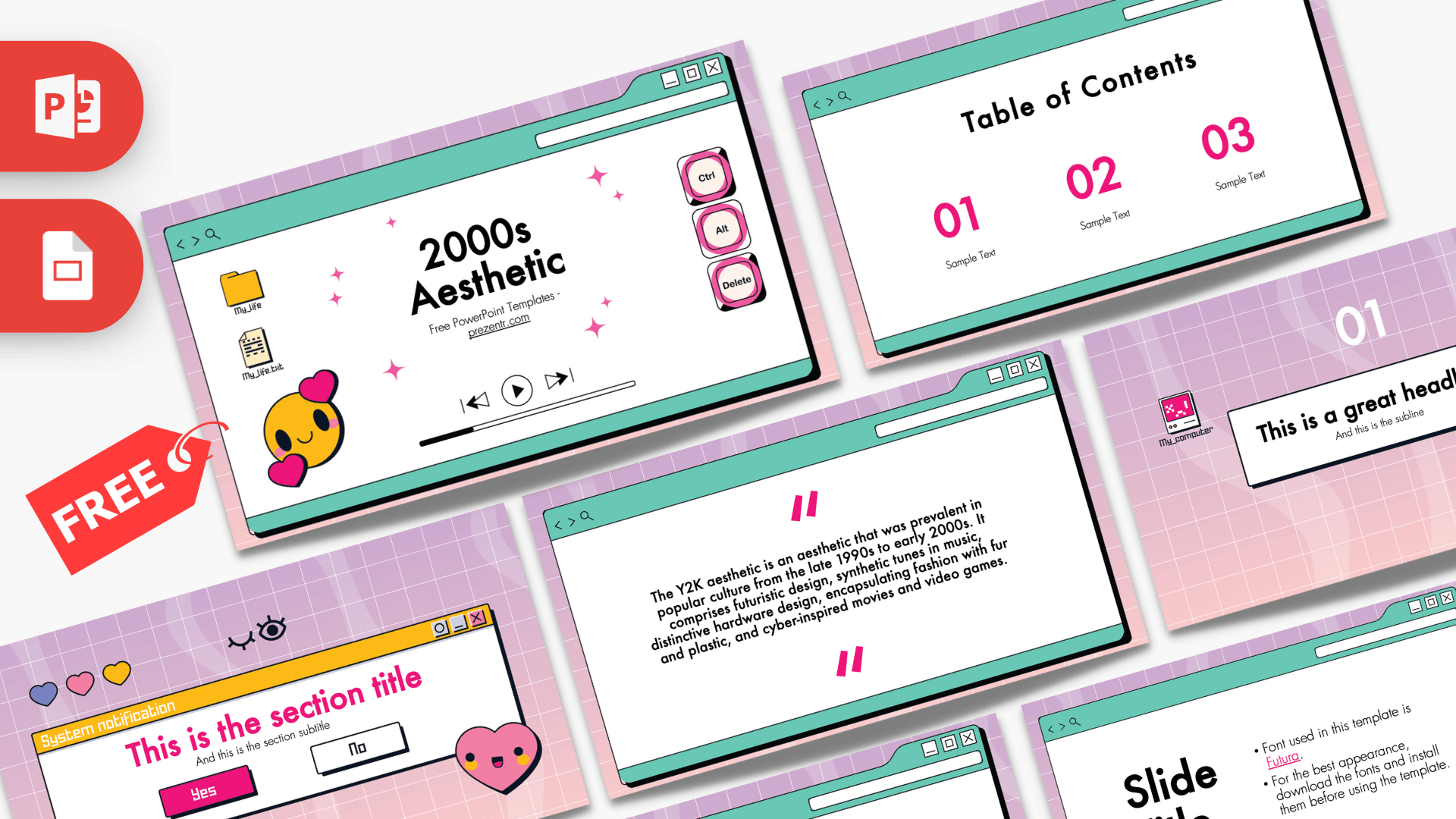
This free 2000s Aesthetic PowerPoint template is a 10-slide throwback to early computer screens, with every slide framed as a retro browser window on a dreamy lilac-to-pink grid background. Smiley faces, hearts, desktop folder icons, keyboard keys, a CD and a "System notification" pop-up bring the Y2K mood to life, while teal windows and hot pink accents keep it fun and readable. It works in PowerPoint and Google Slides and is perfect for anyone who loves nostalgic, internet-era style.
What's Inside
The deck has 10 slides in 16:9 format. Most layouts sit inside a teal browser window with back and forward arrows, a search icon, an address bar and minimize, maximize and close buttons.
- Title slide: the title inside a browser window with "My_life" folder and text file icons, a yellow smiley with pink hearts, Ctrl, Alt and Delete keys, media player buttons and pink sparkles.
- Slide title and text: a pink heading with a short paragraph, great for an introduction.
- Table of contents: three large hot pink numbers with short labels.
- Section title: a yellow "System notification" pop-up with your heading, a pink Yes button and a white No button, plus three hearts, a winking eye and a smiling pink heart character.
- Quote slide: pink quote marks around a short description of the Y2K aesthetic. Replace it with your own text.
- Headline slide: a large "01" above a search bar holding your headline, with a pixel "My_computer" icon and a CD icon on the grid background.
- Slide title with bullets: a big title on the left and bullet points on the right. In the file it notes the template font.
- Bullet points (four): four numbered points in a two-by-two grid.
- Bullet points (five): five numbered points with a title block.
- Big number: one oversized figure with a teal arrow pointing to a caption.
Design and Style
The background is a soft gradient from lilac to blush pink, covered with a fine white grid and faint wavy shapes, like an old screensaver. On top of it, mint teal browser windows with dark outlines and drop shadows act as frames for your content. Hot pink is the main accent for numbers and headings, with touches of yellow, lavender and red in the icons and notification bar.
The illustrations are pure early internet: desktop folders, text files, pixel icons, a CD, keyboard keys and a pop-up dialog. The tone is cute and playful, with hearts and smiley faces adding a sticker-like charm. The template is designed for Futura, as noted on one of the slides, which gives headings a clean, geometric look that balances the busy decorations. The overall mood is nostalgic, upbeat and creative, while the white window areas keep your text easy to read.
Even though the theme is playful, the layouts are practical: a contents slide, list slides and a big number slide cover most of what a real presentation needs. That makes it a fun choice for school work, creative pitches and social events alike. If you add photos, try giving them a white border like an old printed snapshot so they match the window frames.
Who Is This Template For?
- Students who want a fun, eye-catching look for a class presentation or group project.
- Teachers running a lesson on the history of the internet, technology or pop culture.
- Party planners organizing a Y2K or 2000s themed birthday, reunion or dress-up night.
- Content creators and designers pitching a retro-inspired campaign or mood board.
- Fashion and beauty fans presenting trends from the early 2000s.
- Friends and families making a playful slideshow of old photos and memories.
How to Customize It
Download the 2000s Aesthetic PPT template and open it in PowerPoint. For the best appearance, install the Futura font first, as the template recommends; otherwise PowerPoint will substitute a similar font. Click any text box to replace the sample text with your own.
The icons and decorations are separate images and shapes, so you can move, resize or delete them. To add your own pictures, insert a photo inside a browser window, or right-click an existing image and choose Change Picture. You can recolor the pink numbers and headings with Font Color, or change the teal windows with Shape Fill if you want a different retro palette, such as lavender and yellow.
Duplicate the layouts you use most from the thumbnail panel and drag them into order. The "System notification" section slide is a fun way to introduce each part of your talk; just change the heading and keep the Yes and No buttons as a playful touch. You could even turn the buttons into a quick audience poll by asking a yes or no question at the start of each section.
To use the deck as a 2000s Aesthetic Google Slides theme, open Google Slides, choose File, then Import slides or Open, and upload the PowerPoint file. If Futura is missing, choose a similar geometric sans serif from the font menu.
Presentation Ideas
- A pop culture presentation on music, movies and gadgets from the early 2000s.
- A lesson on how the internet and personal computers changed everyday life.
- A Y2K themed birthday party invitation and plan, with a dress code slide.
- A fashion trend report comparing 2000s styles with what is popular today.
- A creative portfolio or "about me" deck with a personal, retro twist.
- A photo slideshow for a school reunion or friends' throwback night.
- A design class critique of early web style: pixel icons, pop-ups, gradients and why they are back in fashion.
Related Templates
For more nostalgic and stylish designs, try the Aesthetic PowerPoint Template, the Aesthetic Design PowerPoint Template and the Windows 11 PowerPoint Template for another computer-screen theme. You can also browse all Google Slides templates.
Frequently asked questions
- Is the 2000s Aesthetic PowerPoint template free?
- Yes, you can download it free from Prezentr and use it for school, personal or work presentations.
- How many slides does the 2000s Aesthetic template have?
- It has 10 slides, including a title, contents, section pop-up, quote, headline, two text layouts, two bullet point layouts and a big number slide.
- Which font should I install for this template?
- The template is designed for Futura, as noted on one of its slides. Install it before editing, or swap in a similar geometric sans serif.
- Can I use the Y2K slides in Google Slides?
- Yes. Import the PowerPoint file into Google Slides through File, then Import slides or Open, and edit it there.
- Can I move or delete the retro icons?
- Yes. The smiley, hearts, folders, CD and keyboard keys are separate elements that you can move, resize or remove.
- Is the template animated?
- No, the file has no animations or transitions. You can add your own in PowerPoint if you want extra movement.